How to Create a Ghibli Art Photo in ChatGPT: Step-by-Step Guide
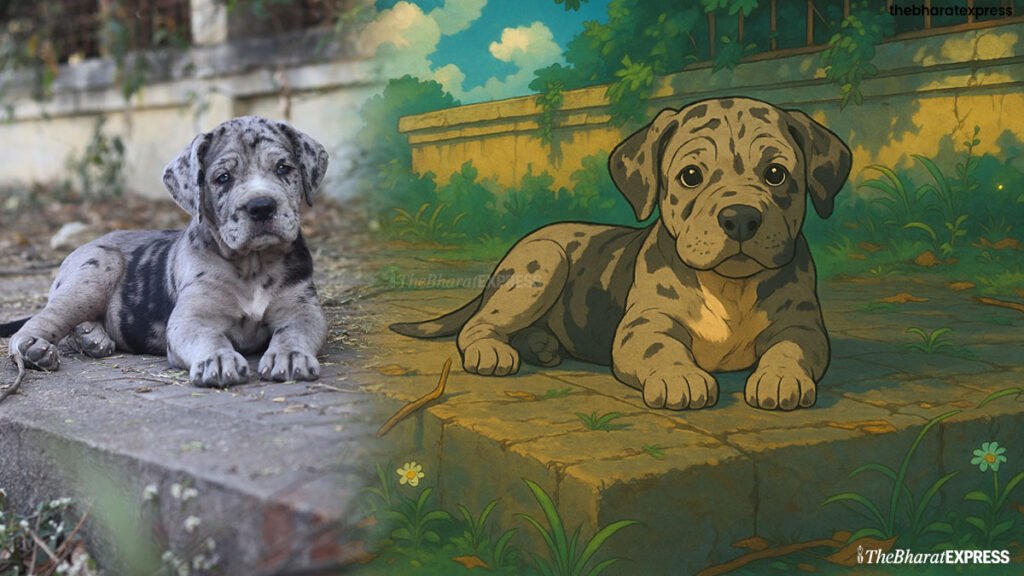
Studio Ghibli’s heartwarming visual style has inspired countless fans around the world. Now, with tools like ChatGPT (with image generation and editing features), you can turn your photos into stunning Ghibli-style artwork — no art skills required!
Here’s your exclusive step-by-step report on how to bring your photos into the magical world of Ghibli — all from within ChatGPT.
📍 Step 1: Open ChatGPT with Image Capabilities
To create visual art in Ghibli style, make sure:
- You’re using ChatGPT with image generation enabled.
- You’re in a chat window (like this one!) where you can upload or describe an image.
How to Create a Ghibli Art Photo in ChatGPT: Step-by-Step Guide
🖼️ Step 2: Upload or Describe a Photo
You have two choices:
- Upload a Real Photo you want transformed.
- Describe a Scene you want created (e.g., “a small countryside house with a cat sitting on the roof under a sunset sky”).
🧡 Tip: Ghibli art shines with nature, emotion, and a bit of whimsy. Think forests, cloudy skies, cozy homes, vintage towns, or magical creatures.
How to Create a Ghibli Art Photo in ChatGPT: Step-by-Step Guide
✨ Step 3: Say the Magic Words
Tell ChatGPT:
“Turn this into a Ghibli-style artwork.”
You can also add specific instructions like:
- “Make the colors soft and dreamy.”
- “Add floating lanterns and fireflies.”
- “Use a warm sunset sky.”
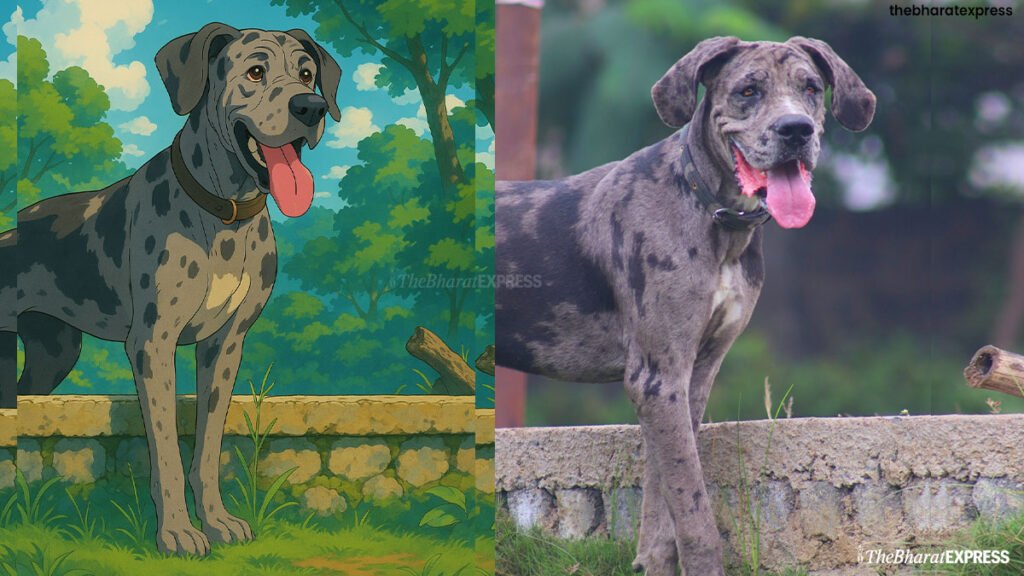
ChatGPT will then generate a custom image based on your request using built-in AI tools.
How to Create a Ghibli Art Photo in ChatGPT: Step-by-Step Guide
Create Ghibli Art Photo online: कैसे बनाएं Ghibli आर्ट फोटो ChatGPT में
🎨 Step 4: Get Your Ghibli Image
Once generated, you’ll see your artwork come to life!
You can:
- View it directly in the chat.
- Ask for variations (e.g., “Can you make it nighttime?” or “Add a Totoro-like creature in the background.”).
- Download or share the image.
🛠️ Step 5: Tweak & Transform More (Optional)
How to Create a Ghibli Art Photo in ChatGPT: Step-by-Step Guide
Want another version? You can say:
- “Make it more colorful.”
- “Add fog or mystical lighting.”
- “Zoom in on the house.”
ChatGPT can edit or generate a brand new Ghibli-style scene based on your feedback — as many times as you like.
🎬 Bonus: Turn It Into an Animated Clip (External Tip)
While ChatGPT can’t animate (yet), you can take your final image to apps like Motionleap, CapCut, or Runway ML to make leaves sway, clouds drift, or stars twinkle.
🧚 Final Thoughts
Thanks to AI and ChatGPT’s image powers, anyone can create breathtaking Ghibli-style art in minutes. Whether it’s a childhood memory, a favorite pet, or a dream cottage in the woods — now it can all be brought to life in the style of your favorite anime films.
Stay whimsical, stay inspired. 🌸
Want to try it now? Just upload a photo or describe a scene, and I’ll Ghibli-fy it for you!